How to Boost WiFi Signal in Your House (7 Fixes, Cheapest First)
By Ken Hollow, unofficial cartographer of every WiFi dead zone in a fox spirit’s unnecessarily large lair I mapped it. I literally drew a map.…
By Ken Hollow, who has measured a flat with a phone app while a fox spirit followed him narrating the readings incorrectly
“Ken. I want a mesh.”
“Do you know what a mesh is?”
“It’s several routers that agree with each other.”
“…That’s annoyingly close to correct.”
“I contain competence, Ken. Sparingly.”
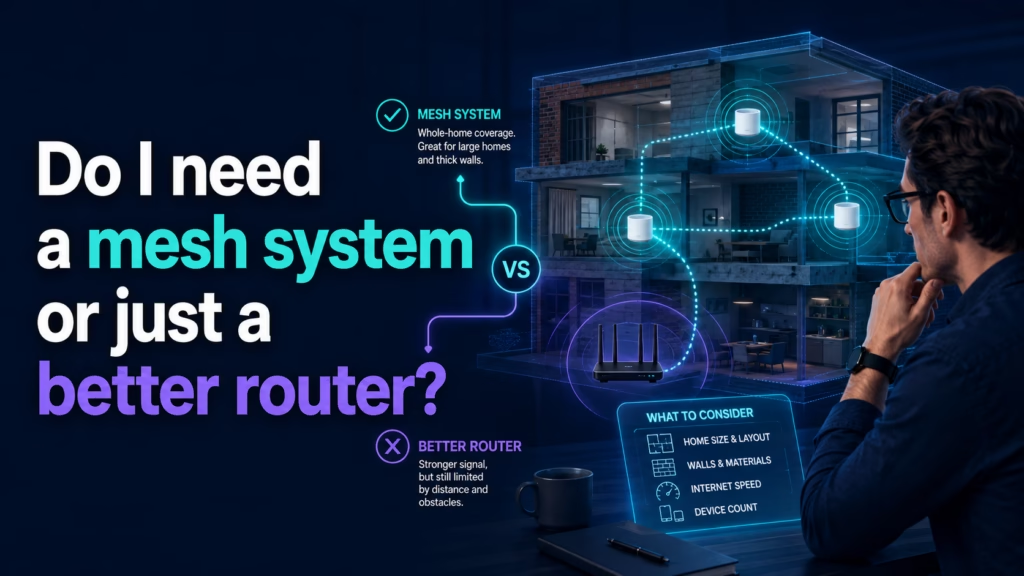
This is a floor plan question, not a speed question. One better router is the right answer for a compact home on one or two floors where a single well-placed unit can reach everywhere — it’s cheaper and simpler. A mesh system is the right answer when distance or construction defeats a single unit: long or spread-out layouts, three or more floors, thick masonry or concrete walls, or a router stuck in a corner you can’t move it out of. If a single router placed centrally already covers your home, mesh is money spent on a problem you don’t have.
A single router broadcasts from one point. Signal weakens with distance and with every wall it passes through. A better router improves the strength and efficiency of that one broadcast point — more capable antennas, better handling of many simultaneous devices, newer WiFi standards.
A mesh system is two or more units placed around your home that work as one network under a single name. Devices hand off between nodes as you move, and the nodes relay traffic back to whichever one is connected to your internet.
The important difference: a better router makes one source stronger. A mesh adds more sources. If your problem is distance, adding sources beats strengthening one, because no amount of transmit power reliably pushes 5 GHz through three brick walls.
Before deciding, establish where the problem actually is. This takes ten minutes and prevents an expensive guess.
Walk your home with a phone, stopping in each room where you actually use devices, and run a speed test in each. Note the results and where the drop-off happens.
Then read the shape of the results:
Good near the router, sharply worse past one or two walls, poor at the far end — this is a distance and obstruction problem. Mesh territory.
Mediocre everywhere including next to the router — this isn’t a coverage problem at all. It’s your internet plan, your line, or the router being faulty. Neither purchase fixes it.
Good almost everywhere with one bad room — you may not need either. A single node added at that spot, or simply repositioning the router, may be enough.
Our guide on why some rooms are slower covers how to interpret this in more detail.
Your home is compact. An apartment, a small house, or anywhere a centrally placed router is within reasonable range of everywhere you sit.
You can place it centrally and openly. Position matters enormously — a mid-range router in the middle of the home, off the floor and out of a cupboard, routinely outperforms an expensive one behind a television. If you haven’t tried repositioning, try that before buying anything.
Your problem is device count, not distance. Lots of devices in a small space — smart home gear, several people streaming — is about capacity, which a newer single router handles well.
You want the cheaper, simpler option. One box, one thing to configure, one thing to fail. A good single router costs meaningfully less than a comparable mesh set.
Your home is long, spread out, or has three or more floors. Signal has to travel too far for one unit regardless of quality.
You have difficult construction. Solid brick, concrete, stone, plaster with metal lath, or foil-backed insulation all absorb WiFi badly. Older buildings with thick internal walls are the classic mesh case — a single router simply cannot get through, and buying a more powerful one mostly buys you a slightly stronger signal that still can’t get through.
Your router’s position is fixed and bad. If the cable enters at one end of the house and can’t be moved, you’re stuck broadcasting from a corner. Mesh solves this by putting a node where the coverage is needed rather than where the cable is.
You move around while connected. If you take calls walking between rooms, mesh handles the handoff far more gracefully than separate networks or extenders.
“So it’s about walls.” — Largely, yes. “Not speed, not price, not how impressive the box looks. Walls.” Walls and distance. “I have been reading reviews for a week, Ken. Nobody mentioned walls.”
Range extenders are the cheap option people try first, and they’re worth understanding because they behave differently from mesh in a way that matters.
A traditional extender receives your WiFi and rebroadcasts it — which typically halves throughput at the extended area, since the unit is talking to your router and your device on the same radio. Many also create a separate network name, so devices cling to the weak original signal instead of switching, and you end up manually swapping networks as you move.
They can be a reasonable fix for one specific dead spot where you mainly need basic connectivity — a garden office, a spare room. They’re a poor foundation for whole-home coverage, which is precisely what mesh was designed to do better.
If you can run an ethernet cable to where the second unit would go, do that. A wired connection to a second access point — or to a mesh node, which most systems support — outperforms any wireless arrangement, because the link back to the router doesn’t consume wireless capacity.
This is the option people skip because it sounds like work, and it’s frequently both cheaper and better. Even one cable to a central point upstairs can transform a house. Powerline adapters, which carry network data over your electrical wiring, are a middle option worth considering where a cable isn’t practical.
Genuinely worth doing first, in order:
1. Move the router. Central, elevated, not in a cupboard, not behind a TV, away from the microwave. Free.
2. Check the band situation. Make sure devices that can use 5 GHz are doing so.
3. Ask your ISP for a newer unit. Often free, as covered in whether it’s worth buying your own router.
4. Then map your speeds room by room and decide.
A meaningful share of people who buy mesh systems would have been fine after step one. The remaining ones genuinely needed it, and for them it’s transformative rather than marginal.
“You moved the router and now the far room works.” — I did. “So we’re not buying the mesh.” We’re not. “I had already named them.” You had already what.
This is a floor plan and construction question, not a speed question. Choose one better router for compact homes where a centrally placed unit can reach everywhere you actually sit, or where your problem is many devices rather than distance — it’s cheaper and simpler. Choose mesh for long or multi-floor layouts, thick masonry or concrete walls, or when the router’s position is fixed in a bad corner. Map it first by running speed tests room by room: a sharp drop past a couple of walls means mesh, mediocre everywhere means neither will help. Extenders roughly halve throughput and are only suitable for one specific dead spot. If you can run an ethernet cable to a second unit, that beats every wireless option — and try repositioning the router before spending anything.

Hi. I’m Ken. I run Two Second Solutions, a one-man agency that somehow landed a fox spirit influencer as a client. I drink too much coffee, blog when I need to vent, and regularly update my résumé just in case she sets the office on fire again. I’m not crying — it’s just spell residue.
By Ken Hollow, unofficial cartographer of every WiFi dead zone in a fox spirit’s unnecessarily large lair I mapped it. I literally drew a map.…

By Ken Hollow, who was informed at 8pm on a Tuesday that the WiFi had “chosen violence” “Ken. It’s happening again.” “What is?” “The evening…

By Ken Hollow, who has been handed a laptop and told “fix it” more times than he has been told “hello” “Ken. The internet is…