Where Did My Phone Storage Actually Go?
By Ken Hollow, who was shown a storage bar with a large grey section and asked, with genuine suspicion, “what is the grey” “Ken. I…
By Ken Hollow, who owns a drawer containing four phones, none of which he can justify, all of which he will keep
“Ken. What’s in this drawer?”
“Old phones.”
“Why?”
“In case.”
“In case of what, Ken.”
“…I’ll get back to you.”
Sell or trade it in if it’s under about four years old and still gets security updates — that’s when it’s worth real money, and its value only falls from here. Repurpose it if it’s too old to sell for much but still works: a security camera, a dedicated music or sat-nav device, or a kids’ device are all genuinely useful. Recycle it properly if the battery is swollen or it won’t hold a charge. The one option that’s always wrong is the drawer, which is where phones go to lose their remaining value while slowly degrading.
Everything follows from these.
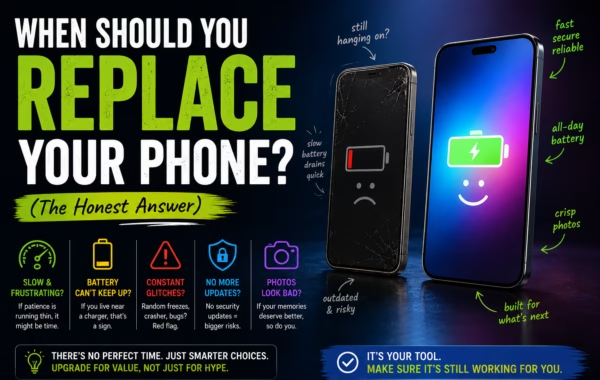
Does it still get security updates? This determines whether it’s safe for anything involving accounts, payments, or personal data. Once a phone stops receiving patches, known vulnerabilities stay open permanently. It doesn’t become useless — but it should stop being trusted with your email and banking. Our guide on when to replace your phone covers how to check.
How’s the battery? A phone that dies in two hours is a poor portable device but a perfectly good stationary one, because stationary uses keep it plugged in permanently.
Those two answers point almost directly at the right choice.
Best when: it’s roughly four years old or newer, still supported, screen and battery in decent shape.
Phones depreciate steadily and relentlessly. The phone in your drawer is worth less today than last month and will be worth less again next month. If you’re going to sell, the correct time is essentially always “now.”
Trade-in through a manufacturer or carrier is the least effort and pays the least. Selling privately pays more and involves dealing with strangers. Buy-back services sit in between.
Before you hand it to anyone: back it up, sign out of your accounts properly (this matters — on iPhone, turn off Find My and sign out of your Apple ID; on Android, remove your Google account), then factory reset. A device still tied to your account is often unusable for the buyer and leaves your data attached to hardware you no longer control.
If a phone is more than five or six years old, realistically it’s worth very little. At that point repurposing usually beats the small amount you’d get.
Best when: it’s too old to sell for much, works fine, and you have somewhere to plug it in.
This is the best-known reuse and genuinely good. A free app turns an old phone into a motion-detecting camera that streams to your current phone — useful for watching a doorway, a garage, a pet, or a room while you’re away.
What makes it work well:
Keep it permanently plugged in. Battery condition stops mattering entirely, which is the whole point of a stationary use.
Mind the heat. A phone streaming video continuously runs warm. Don’t seal it in an enclosure or leave it in direct sun — heat is what will eventually kill it.
Put it on your guest network. An old phone running an unmaintained app is exactly the kind of device to isolate from your main network. This is precisely what a guest WiFi network is for.
Strip it first. Factory reset, then sign in only to what the camera app needs. Don’t leave your personal accounts on a device that lives pointed at a window.
Be realistic about limitations: no proper night vision, a fixed narrow view, and it depends on your WiFi reaching it. It’s a genuinely useful monitor, not a replacement for a real security system.
“I pointed one at the kitchen.” — Why the kitchen? “To see who keeps moving my things.” Nana, you live alone with me. “Exactly, Ken. The evidence is gathering.”
Best when: the phone works but you want it doing one thing without distractions.
Underrated, and often more useful day-to-day than a camera.
A music and podcast player — load it up, leave it in the car or the kitchen, stop draining your real phone.
A dedicated sat-nav — mounted in the car, permanently charging, no interruptions from calls and messages while driving.
A kitchen or workshop device — recipes, timers, videos, in a place you’d rather not bring an expensive phone.
A kids’ device — with a SIM removed, on a guest network, with parental controls. If it’s out of security support, keep it to offline games and downloaded video rather than general browsing.
An emergency backup phone — kept charged in a drawer with a working charger. In most regions, phones can dial emergency services without an active SIM. This is the one legitimate version of “keeping it in a drawer,” and it only counts if you actually charge it occasionally.
A travel phone — carrying an old phone with minimal accounts on it to somewhere you’d rather not risk your main device is a real, sensible use.
Best when: the battery is swollen, it won’t hold charge, the screen is badly damaged, or it’s simply too old to be safe or useful.
A swollen battery is not a “later” problem. If the phone’s back or screen is bulging or lifting, stop charging it and recycle it now — damaged lithium cells are a genuine fire risk, which is a poor thing to store in a drawer.
Manufacturers, carriers, and most electronics retailers take old devices free. Many local authorities have e-waste collection. Phones contain materials genuinely worth recovering and some that shouldn’t go to landfill.
Wipe it first anyway. Sign out of accounts, then factory reset, even if the screen barely works and even if you’re throwing it away.
The default outcome for most phones, and it’s the only option with no upside.
Value drops the entire time it sits there. Batteries degrade when stored at full or empty charge for long periods. Eventually it’s too old to sell, too old to update, and possibly a swollen battery in a drawer.
If you genuinely want a backup phone, that’s fine — but make it deliberate. Charge it every few months, keep it around half charge for storage, and know where the charger is. A “backup phone” you haven’t touched in three years is not a backup, it’s a drawer with an obligation attached.
Whatever you choose, back it up before wiping. Once it’s reset, whatever wasn’t backed up is gone.
“You have four phones in a drawer, Ken.” — I’m aware. “You wrote an entire article about why that’s wrong.” I did. “And?” And I’ve moved them to a different drawer.
Decide with two questions: does it still get security updates, and does the battery still work. Sell or trade in if it’s under about four years old and supported — value only falls, so now is always the right time. Repurpose if it’s too old to be worth much: a plugged-in security camera, a car sat-nav or music player, a kitchen device, or a kids’ device all work well, and stationary uses make a bad battery irrelevant. Put any repurposed device on your guest network and factory reset it first. Recycle immediately if the battery is swollen — that’s a fire risk, not a someday task. Always back up, sign out of your accounts, and factory reset before it leaves your hands.

Hi. I’m Ken. I run Two Second Solutions, a one-man agency that somehow landed a fox spirit influencer as a client. I drink too much coffee, blog when I need to vent, and regularly update my résumé just in case she sets the office on fire again. I’m not crying — it’s just spell residue.
By Ken Hollow, who was shown a storage bar with a large grey section and asked, with genuine suspicion, “what is the grey” “Ken. I…

By Ken Hollow, the man who once watched a computer take eleven minutes to boot and seriously considered a career change “Ken. Your computer is…
By Ken Hollow, the man who has been asked by a fox spirit to justify the continued existence of a phone that is, in her…