Why is my WiFi So Slow?
By Ken Hollow, the only IT support tech whose help tickets come written in riddles and moonlight It started, as most catastrophes do, with Nana…
By Ken Hollow, the man who gave his WiFi password to a visiting relative in 2022 and discovered three months later that they had shared it with everyone they knew
“Ken. My cousin is visiting. What’s the WiFi password?”
“Use the guest network.”
“We have a guest network?”
“We do now. I set it up after the incident.”
“What incident?”
“The one I don’t talk about.”
“…”
“Your uncle gave my main network password to his bowling team.”
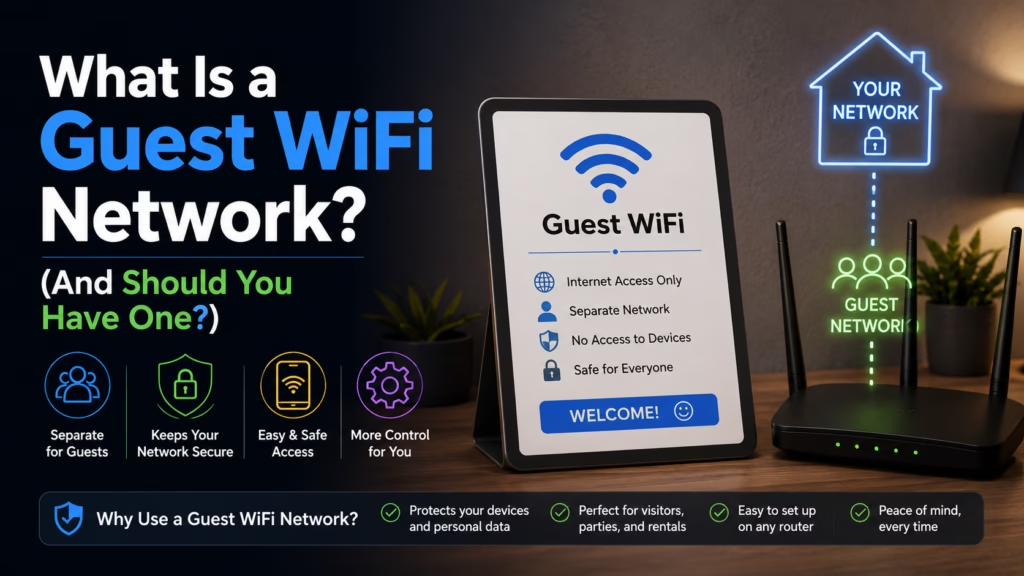
A guest WiFi network is one of those things that sounds like an optional extra until you understand what it actually does, at which point it becomes obvious that everyone with guests, smart home devices, or any interest in their home network security should have one. Here’s what it is and why it matters.
A guest WiFi network is a separate, isolated network your router creates alongside your main network. Devices on the guest network can use your internet connection but cannot see or communicate with devices on your main network — your computers, phones, printers, smart home devices, and anything else connected to your primary network. It’s a separate lane on the same road, with walls between them.
When someone connects to your main WiFi, they’re on the same local network as everything else in your home. With the right tools, they could potentially see other devices on that network, access shared folders or printers, attempt to communicate with smart home devices, or monitor network traffic. Most guests have zero interest in doing any of this — but the capability exists, and not every guest you’ve ever given your password to is someone you’d trust with that access.
A guest network removes that capability entirely. Devices on it are isolated — they can reach the internet, but they’re walled off from your main network. Your laptop, your NAS drive, your work computer, your smart home hub: none of these are visible or reachable from the guest network.
There are three main use cases where this matters:
Actual guests. Friends, family, Airbnb visitors, anyone visiting your home who needs internet. They get access without getting access to everything. Your main network password stays private, and even if they share the guest password, they’re not sharing access to your network — just your internet connection.
Smart home and IoT devices. Smart TVs, robot vacuums, smart speakers, security cameras, thermostats — these devices are often less secure than your computers and phones. Security vulnerabilities in IoT devices are common and often unpatched. Putting them on a guest network isolates them: if a smart bulb is compromised, the attacker is on an isolated network, not your main one where your laptop lives.
Work from home situations. If you have a work laptop that your employer manages, your IT policy may require it to be on a separate network from personal devices. A guest network handles this cleanly.
“So I should put my smart speaker on the guest network because it’s less secure than my phone?” — That’s the recommendation, yes. Smart speakers in particular are always listening and have had documented security issues. Isolating them means that even in a worst case, they can’t reach the rest of your network. “I’m slightly alarmed that my kettle could theoretically be a security risk.” Welcome to the Internet of Things. “I don’t like it.” Most security professionals don’t either.
| Feature | Main Network | Guest Network |
|---|---|---|
| Internet access | Yes | Yes |
| Can see other devices on network | Yes | No — isolated |
| Can access shared printers/drives | Yes | No |
| Speed | Full | Full (can be limited if your router supports bandwidth controls) |
| Password | Your main password — keep this private | Separate password — safe to share |
| Best for | Your personal devices, computers, phones | Guests, IoT devices, smart home gadgets |
Most routers made in the last 5-6 years support guest networks. The setup takes about five minutes.
Via your router’s app (easiest): Most modern routers (Eero, Google Nest WiFi, TP-Link Deco, Netgear Orbi) have a companion app with a guest network option in the main menu. Tap “Guest Network,” toggle it on, set a name and password, save. Done.
Via your router’s web interface: Open a browser and go to your router’s admin page — usually 192.168.1.1 or 192.168.0.1 (check the label on your router if unsure). Log in with your router’s admin credentials (often on the label too). Look for “Guest Network,” “Guest Access,” or “Wireless” settings. Enable it, name it something obvious like “YourName-Guest,” set a password, and save.
If you can’t find a guest network option, your router may not support it — this is common on older or ISP-provided basic routers. It’s one of the reasons upgrading from the ISP’s provided hardware is often worthwhile.
Use a different password from your main network. Obviously. The whole point is that guests get the guest password, not your main one.
Name it clearly. Something like “Smith-Guest” makes it easy for visitors to find without confusion.
Consider a simple, shareable password. Your main network password can be long and complex because you rarely share it. The guest password gets shared — something memorable is fine since the network access is isolated anyway.
Change it occasionally. If you’ve given the guest password to a lot of people over time and want to reset access, changing the guest password is quick and doesn’t affect your main network at all.
Put your smart home devices on it. This is arguably more important than the guest-visitor use case. A compromised IoT device on an isolated network is a contained problem. The same device on your main network is a potential entry point to everything else.
“I’ve moved the smart speaker, the TV, and the robot vacuum to the guest network. The robot vacuum in particular — I don’t trust it. It knows too much about the floor plan.” — That’s not entirely paranoid. Some robot vacuums have had data collection and security issues. Isolating it is the right call. “It now has internet but cannot reach my laptop.” Correct. “Good. It was getting ideas.” The vacuum was not getting ideas. But this is fine.
A guest WiFi network is a separate, isolated network your router creates alongside your main one. Devices on it get internet access but cannot see or communicate with anything on your main network. Use it for: actual guests (so they never need your real password), smart home and IoT devices (smart TVs, speakers, vacuums — isolate them from your main devices), and work devices that need network separation. Setup takes five minutes via your router’s app or web interface. Most routers from the last 5-6 years support it; older ISP-provided routers often don’t. Keep the guest password separate, make it shareable, and change it occasionally. Moving IoT devices to the guest network is one of the easiest home network security improvements you can make.

Hi. I’m Ken. I run Two Second Solutions, a one-man agency that somehow landed a fox spirit influencer as a client. I drink too much coffee, blog when I need to vent, and regularly update my résumé just in case she sets the office on fire again. I’m not crying — it’s just spell residue.
By Ken Hollow, the only IT support tech whose help tickets come written in riddles and moonlight It started, as most catastrophes do, with Nana…
By Ken Hollow, the man whose fox spirit roommate has declared the upstairs hallway “the dead zone” and refuses to take calls there on principle…
By Ken Hollow, who has measured a flat with a phone app while a fox spirit followed him narrating the readings incorrectly “Ken. I want…