Why is my WiFi So Slow?
By Ken Hollow, the only IT support tech whose help tickets come written in riddles and moonlight It started, as most catastrophes do, with Nana…
By Ken Hollow, the man who spent twelve minutes on a tech support call before realising Nana had unplugged the modem thinking it was “the router that makes the internet slow”
“Ken. I unplugged the router like you told me.”
“The WiFi is still down.”
“I know. I unplugged the router.”
“Which box did you unplug?”
“The one with the lights.”
“They both have lights, Nana.”
“…The one near the window.”
“That’s the modem.”
“Aren’t they the same thing?”
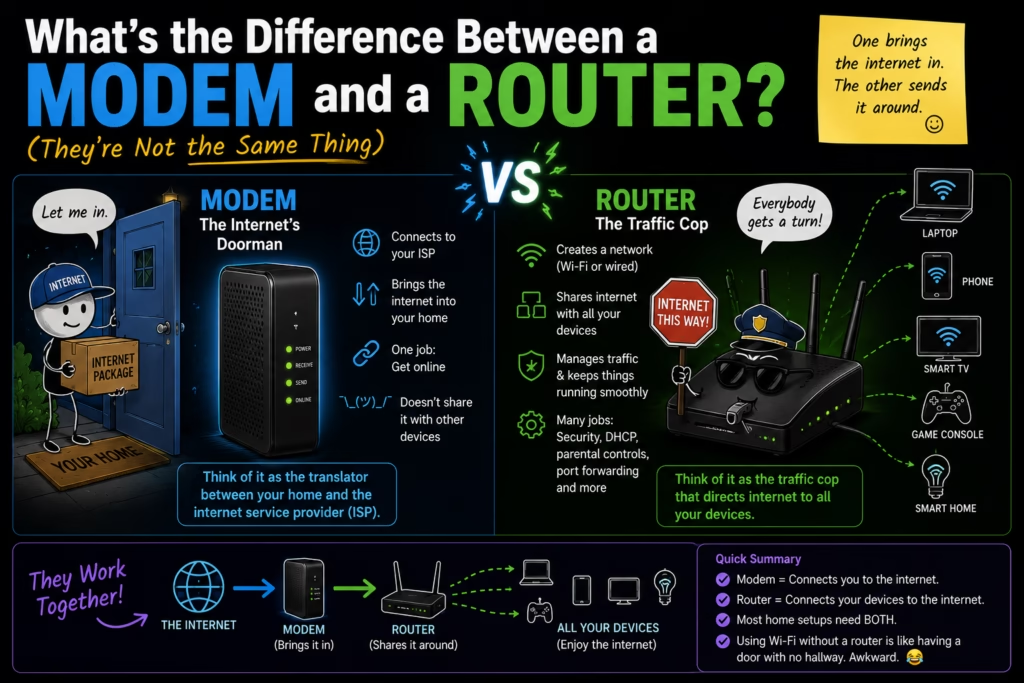
They are not the same thing. They are two different devices doing two completely different jobs, and confusing them is one of the most common home network mistakes — leading to the wrong device being restarted, replaced, or blamed. Here’s what each one actually does.
A modem connects your home to the internet — it’s the bridge between your internet service provider’s network and your home. A router takes that internet connection and distributes it to all the devices in your home, either via WiFi or ethernet cable. The modem talks to your ISP. The router talks to your devices. Both need to be working for you to have internet.
Your internet service provider (ISP — Comcast, AT&T, Spectrum, BT, Vivacom, whoever you pay for internet) delivers internet service to your home via a physical connection: a coaxial cable, a phone line, or a fibre optic cable coming through the wall. That signal is in a format your devices can’t directly use.
The modem’s job is to translate that signal into a form your home network can work with. “Modem” is short for modulator-demodulator — it modulates outgoing data into the format the ISP’s network uses, and demodulates incoming data back into something your devices understand.
The modem connects directly to that cable or phone line on one side, and typically has a single ethernet port on the other side that connects to your router. Without the modem, there’s no internet signal in your home at all.
The router takes the single internet connection coming from the modem and shares it with every device in your home. It creates your home network — assigning each device its own local IP address, managing traffic between devices, and broadcasting the WiFi signal your phone, laptop, and smart TV connect to.
Think of it this way: the modem is the pipe bringing water into the building. The router is the plumbing system that routes that water to every tap in every room. Both are essential. The pipe without plumbing means water that only reaches the front door. Plumbing without a pipe means no water at all.
The router also acts as a basic firewall — it sits between the public internet and your home devices, blocking unsolicited incoming connections. This is why devices behind a router are generally safer than devices connected directly to the internet.
“So the modem is the front door and the router is the hallway that leads to every room?” — That’s a good analogy. The modem lets the internet in. The router directs it where to go. “And if I unplug the modem, the internet doesn’t enter the house at all.” Correct. “Which is what I did.” Which is what you did.
This is the most practical thing to know. When your internet stops working:
If nothing has internet access — no WiFi, no wired connections, nothing — start with the modem. Unplug it, wait 30 seconds, plug it back in. Give it a minute to reconnect to your ISP. If internet returns, you’re done. If not, restart the router too.
If WiFi isn’t working but a wired connection works — the modem is fine, the issue is with the router. Restart the router.
If some devices work and others don’t — the modem and router are both fine. The issue is with the specific device. Restart that device or check its WiFi settings.
If internet is slow everywhere — this is usually either an ISP issue (outside your control), or a router that needs a restart. Try the router first. If it persists, check if there’s a known outage with your ISP.
Many ISPs provide a single device that combines the modem and router in one box — called a gateway or combo unit. If your ISP gave you one device when you signed up, it’s almost certainly a gateway doing both jobs.
Gateways are convenient (one device, one power plug, one thing to manage) but they’re often not as good as buying a dedicated modem and router separately. ISP-provided gateways tend to be basic, slow to update, and harder to replace when they fail. Many people use the ISP gateway just as a modem and plug their own higher-quality router into it for better WiFi performance.
| Device | What It Does | Connects To |
|---|---|---|
| Modem | Brings internet into your home from your ISP | ISP cable/line on one side, router on the other |
| Router | Distributes internet to all devices, creates WiFi | Modem on one side, all your devices on the other |
| Gateway (combo) | Does both jobs in one device | ISP cable/line on one side, all your devices on the other |
Most ISPs rent you a modem or gateway for a monthly fee — typically $10-15/month. Buying your own compatible modem pays for itself in 12-18 months and you have full control over the hardware. The catch: you need to verify the modem is compatible with your ISP and service tier before buying.
For the router side, buying your own almost always gives you better WiFi performance, more configuration options, and longer software support than the router built into an ISP gateway. If you’ve been struggling with weak WiFi in certain rooms or generally slow speeds, the ISP’s combo unit is often the culprit.
“I’ve been paying a monthly fee for a device I don’t own, that I can’t control, and that is apparently mediocre.” — That’s a fair summary of the ISP gateway situation. “And I could just buy one and stop paying the fee.” You could. “I’m going to think about this.” Take your time. The modem stays plugged in either way.
A modem connects your home to your ISP’s internet service — it’s the device the cable or phone line plugs into. A router takes that connection and shares it across all your devices, creating your WiFi network. They do completely different jobs and both need to work for you to have internet. Many ISPs provide a single gateway device that combines both — convenient but often lower quality than buying separately. When troubleshooting: no internet anywhere means restart the modem first; WiFi down but wired works means restart the router; one device not connecting means the issue is with that device. ISPs typically charge a monthly rental fee for their device — buying your own modem pays for itself in about a year.

Hi. I’m Ken. I run Two Second Solutions, a one-man agency that somehow landed a fox spirit influencer as a client. I drink too much coffee, blog when I need to vent, and regularly update my résumé just in case she sets the office on fire again. I’m not crying — it’s just spell residue.
By Ken Hollow, the only IT support tech whose help tickets come written in riddles and moonlight It started, as most catastrophes do, with Nana…
By Ken Hollow, who has been handed a laptop and told “fix it” more times than he has been told “hello” “Ken. The internet is…
By Ken Hollow, who has measured a flat with a phone app while a fox spirit followed him narrating the readings incorrectly “Ken. I want…