Should I Turn Off My Router at Night to Save Power?
By Ken Hollow, the man whose fox spirit client insists on unplugging the router every night because she believes WiFi signals “interfere with dream quality.”…
By Ken Hollow, a man who once had to explain to a fox spirit that the microwave was not, in fact, “attacking the router out of jealousy.”
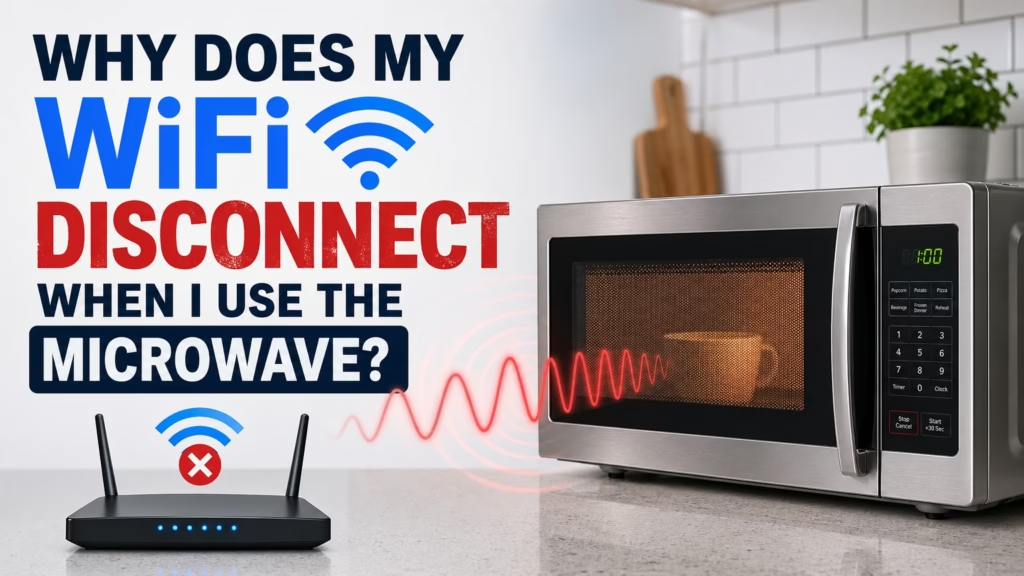
Nana microwaved leftover dumplings last Thursday while I was on a video call with a client. My camera froze. My audio cut out. The client saw three seconds of my face buffering into a Picasso painting before the call dropped entirely. Nana walked back in, dumplings in hand, and said, “Your internet is broken again. You should call someone.”
She had called someone. She called the problem.
If your WiFi drops, stutters, or slows down every time someone fires up the microwave, you’re not imagining things. There’s a real, physical reason this happens — and it’s fixable.
Your microwave oven and your WiFi router both operate on the 2.4 GHz frequency. When the microwave runs, it generates around 1,000 watts of electromagnetic energy at that frequency. Even with shielding, a small amount leaks out — and it’s powerful enough to drown out your router’s signal, which operates at less than 1 watt. It’s like trying to whisper next to someone using a megaphone.
This sounds like a design flaw, and honestly, it kind of is — but it’s also an accident of history.
Microwave ovens were developed in the 1940s and use 2.45 GHz because water molecules absorb energy efficiently at that frequency, which is what heats your food. When WiFi came along decades later, regulators assigned it to the 2.4 GHz band partly because microwave ovens were already there. The logic was essentially: “This frequency band is already noisy from kitchen appliances, so we don’t need to reserve it for anything critical. Let unlicensed devices use it.”
Your WiFi inherited the microwave’s neighbourhood. It’s been dealing with the noisy neighbour ever since.
“So you’re telling me the engineers KNEW the microwave was there first and put the WiFi there ANYWAY? That’s not engineering. That’s moving into an apartment next to a nightclub and then complaining about the bass.”
Let’s address the worry people always have but rarely ask out loud: if the microwave is leaking enough energy to interfere with WiFi, is it also leaking enough to be harmful?
In most cases, no. All microwaves leak a tiny amount of electromagnetic energy — safety regulations allow up to 5 milliwatts per square centimetre at a distance of 5 cm from the oven. That’s a very small amount, and it falls off rapidly with distance. Your WiFi interference is happening because your router’s signal is incredibly weak by comparison (less than 1 watt), not because the microwave leakage is dangerously high.
That said, if your microwave is old, visibly damaged around the door seal, or the interference is severe even from across the house — that could indicate more leakage than normal. In that case, it might be worth replacing the microwave regardless of WiFi concerns.
The good news is that this is one of the most straightforward WiFi problems to solve. Here are your options, from easiest to most effective:
The closer the router is to the microwave, the worse the interference. If they’re in the same room — or worse, on the same countertop — just creating physical distance helps significantly. Different rooms is ideal. Even a few metres makes a difference because the leaking energy drops off quickly with distance.
This is the real fix. Your microwave operates at 2.45 GHz, which only interferes with the 2.4 GHz WiFi band. The 5 GHz band is on a completely different frequency and is totally unaffected by your microwave. If your router is dual-band (most routers from the last 5-6 years are), connect your devices to the 5 GHz network and the microwave problem disappears entirely.
The trade-off: 5 GHz has shorter range and doesn’t pass through walls as well as 2.4 GHz. But if you’re close enough to the router for the microwave to be an issue, you’re probably close enough for 5 GHz to work fine.
If you’re stuck on 2.4 GHz for some devices (older smart home gadgets, for example), try changing the WiFi channel. The 2.4 GHz band has channels 1 through 11. Your microwave blasts energy at 2.45 GHz, which overlaps most heavily with channels 7-11. Switching to channel 1 or 2 can reduce — though not always eliminate — the interference. You can change the channel in your router’s admin settings (usually accessible at 192.168.0.1 or 192.168.1.1 in your browser).
Newer microwaves have better shielding. If yours is 10+ years old and the WiFi interference is severe, the shielding may have degraded — seals wear down, metal joints corrode. A new microwave might solve both the WiFi problem and any safety concerns in one purchase.
“I switched to 5 GHz and now I can microwave AND stream at the same time. This is the peak of human civilisation and nobody is giving it enough credit.”
It’s not just microwaves. The 2.4 GHz band is shared by baby monitors, cordless phones, Bluetooth devices, garage door openers, and some security cameras. If your WiFi is slow and you can’t figure out why, any of these could be contributing. The 2.4 GHz band is essentially the communal kitchen of wireless frequencies — everyone’s in there making noise, and sometimes the signals step on each other.
This is also why most modern routers are dual-band: the 5 GHz band is far less crowded. And newer WiFi 6E routers add a 6 GHz band, which is practically empty right now. The more devices move to higher bands, the less any of this matters.
Your microwave and your WiFi both operate near 2.4 GHz. The microwave uses about 1,000 watts; your router uses less than 1. Even tiny leakage from the microwave overwhelms the router’s signal. Fix it by switching to the 5 GHz WiFi band (best solution), moving the router away from the microwave, or changing the WiFi channel. If the interference is severe and your microwave is old, the shielding may be degraded — consider replacing it. It’s not dangerous in most cases, just annoying.
“I have decided the microwave and the router have a rivalry. I will not be taking sides. I need both of them. But the microwave makes dumplings, so if pressed, I know where my loyalties lie.”

Hi. I’m Ken. I run Two Second Solutions, a one-man agency that somehow landed a fox spirit influencer as a client. I drink too much coffee, blog when I need to vent, and regularly update my résumé just in case she sets the office on fire again. I’m not crying — it’s just spell residue.
By Ken Hollow, the man whose fox spirit client insists on unplugging the router every night because she believes WiFi signals “interfere with dream quality.”…
By Ken Hollow, who has been handed a laptop and told “fix it” more times than he has been told “hello” “Ken. The internet is…
By Ken Hollow, the only IT support tech whose help tickets come written in riddles and moonlight It started, as most catastrophes do, with Nana…