What Is Bluetooth and How Does It Work? (Plain English Guide)
By Ken Hollow, the man whose earbuds keep pairing with a fox spirit’s phone from across the room “Ken. Your earbuds are playing MY music.”…
By Ken Hollow, the man who had to explain to a fox spirit that the pixelated square on the menu is not “a digital rune”
We were at a restaurant. There was no paper menu. Just a little card on the table with a black-and-white square on it and the words “Scan to view menu.”
Nana stared at it for a full ten seconds.
“Ken. What is this. Is this a spell?”
“It’s a QR code. Point your phone camera at it.”
She did. The menu appeared. She gasped like she’d just witnessed sorcery.
“The SQUARE opened a WEBSITE? How does a SQUARE open a WEBSITE?”
That’s actually a great question — and the answer is more clever than most people realize. QR codes are everywhere now: restaurant menus, concert tickets, payment apps, product packaging, bus stops, business cards. But how do those little pixel squares actually work?
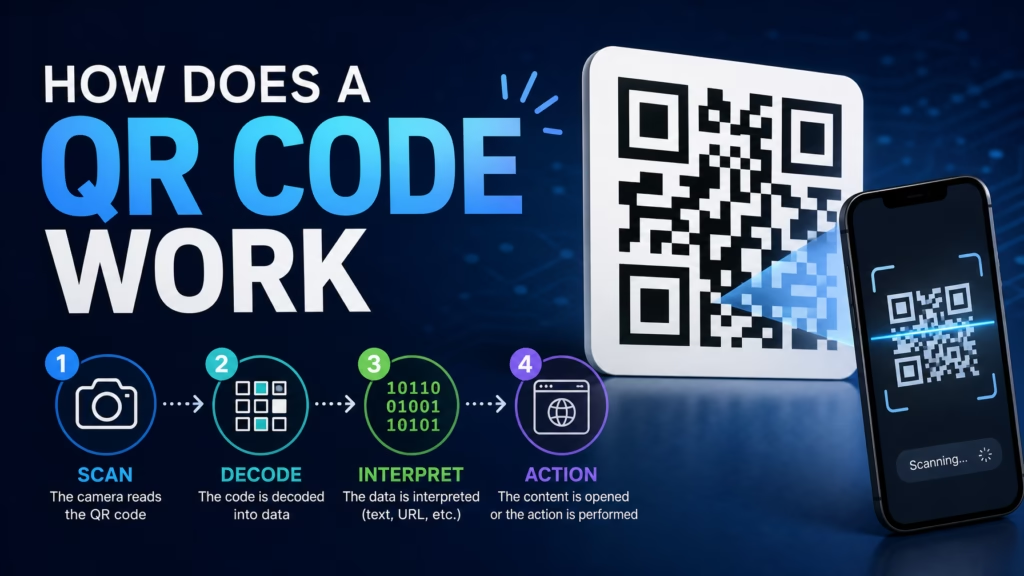
A QR code is a two-dimensional barcode that stores information — usually a website URL — in a pattern of black and white squares. When you scan it with your phone camera, the camera reads the pattern, decodes the data, and takes you to the linked content. It’s like a regular barcode but can hold much more information and works in any orientation.
A QR code (Quick Response code) is essentially a visual way of encoding text. The most common use is encoding a website URL, but QR codes can contain any text-based information: phone numbers, email addresses, WiFi passwords, plain text messages, contact details, or app download links.
The data is encoded in the pattern of black and white modules (the small squares that make up the code). Each module represents a binary digit — black for 1, white for 0. Together, these binary digits form the encoded data, similar to how barcodes on products work, but in two dimensions instead of one.
A standard barcode (the kind on grocery products) holds about 20-25 characters of information — enough for a product number. A QR code can hold up to 4,296 alphanumeric characters — enough for a full URL, a paragraph of text, or a complete contact card.
When you point your phone camera at a QR code, the camera app (on both iPhone and Android) automatically detects the pattern and processes it. Here’s what happens in the fraction of a second between pointing and the result appearing:
The camera identifies the QR code using the three large squares in the corners — these are called finder patterns, and they tell the scanner “this is a QR code” and establish the orientation. This is why QR codes work no matter which angle you scan them from — even upside down.
The scanner reads the smaller patterns to determine the version (size) and error correction level of the code. Then it decodes the black-and-white module pattern into binary data, converts that into the encoded text (usually a URL), and presents it to you — typically as a clickable link that opens in your browser.
The whole process takes less than a second. No special app is needed on modern phones — the default camera app handles it.
“So the three big squares are like landmarks, and the tiny squares are the actual message? It’s like a map with its own legend built in.” — That’s… actually a perfect analogy. Again.
Those three large squares in three corners of every QR code are the finder patterns. They serve a critical purpose: they let the scanner instantly locate and orient the code, regardless of angle, rotation, or distance.
The fourth corner (bottom-right) has a smaller alignment pattern instead of a finder pattern. Together, these landmarks allow the scanner to calculate the code’s geometry and correct for any distortion — like if you’re scanning at an angle or the surface is curved.
There’s also a timing pattern (the alternating black-and-white line between the finder patterns) that helps the scanner determine the exact spacing of the modules. It’s a brilliantly engineered system designed to work reliably in messy real-world conditions.
You’ve probably seen QR codes with a company logo in the center, or ones using colors instead of plain black and white. These work because QR codes have built-in error correction.
Every QR code includes redundant data — copies of the information arranged so that even if part of the code is damaged, obscured, or replaced with a logo, the scanner can still reconstruct the complete message. At the highest error correction level, up to 30% of the code can be damaged or covered and it’ll still scan correctly.
That’s why companies can put their logo right in the middle of a QR code without breaking it. The surrounding modules contain enough redundant information to compensate for the missing center.
The QR code itself is always safe — it’s just encoded text. But what it links to can be dangerous, just like any link you click on the internet.
The risks:
Phishing. A QR code on a sticker could link to a fake login page designed to steal your credentials. Attackers have been caught placing fake QR codes over legitimate ones on parking meters, restaurant tables, and public notices.
Malicious downloads. A QR code could link to a page that prompts you to download malware, especially on Android devices where you can install apps from outside the Play Store.
How to stay safe:
Before scanning, check if the QR code looks like it’s been placed over another one (a sticker on top of a printed code is a red flag). After scanning, your phone will show you the URL before opening it — check that it looks legitimate. Don’t scan random QR codes from unknown sources like flyers on the street or unsolicited mail. And be especially cautious with QR codes that ask you to log in or enter payment information — verify you’re on the real website by checking the URL carefully.
For general safety online, a VPN adds an extra layer of protection, and checking if your email has been compromised is always a good practice.
“So I should check the URL after scanning before tapping? Ken says this is ‘basic digital hygiene.’ I say it’s ‘reasonable paranoia.’ Same thing.”
A QR code is a two-dimensional barcode that encodes text — usually a URL — in a pattern of black and white squares. The three large squares in the corners help your phone’s camera locate and orient the code instantly, even at weird angles. Error correction means up to 30% of the code can be damaged or covered (like with a logo) and still work. Your phone’s default camera app can scan them — no special app needed. QR codes themselves are safe, but always check the URL they link to before tapping, just like any link. Watch out for stickers placed over original codes in public places.

Hi. I’m Ken. I run Two Second Solutions, a one-man agency that somehow landed a fox spirit influencer as a client. I drink too much coffee, blog when I need to vent, and regularly update my résumé just in case she sets the office on fire again. I’m not crying — it’s just spell residue.

By Ken Hollow, the man whose earbuds keep pairing with a fox spirit’s phone from across the room “Ken. Your earbuds are playing MY music.”…
By Ken Hollow, the man who had to explain to a fox spirit that the “accept all cookies” button is not an invitation to baked…
By Ken Hollow, the man who had to explain to a fox spirit that “encrypted” does not mean the message is written in a secret…