What Is an IP Address? (Explained Like You’re Not an Engineer)
By Ken Hollow, the man who tried to explain IP addresses to a fox spirit and accidentally triggered an existential crisis about digital identity “Ken.…
By Ken Hollow, the man who discovered that a fox spirit has been using the same password — slightly modified — for every account since 2017, and that she considered this “a system”
“Ken. What’s your password for things?”
“I use a password manager. Every account has a different one.”
“How do you remember them all?”
“I don’t. That’s the point. The manager remembers them.”
“So you have one password.”
“One password to unlock the manager. The manager handles everything else.”
She thought about this. “That sounds like either a very good idea or a catastrophically bad one depending on one thing.”
“What’s the one thing?”
“Whether the manager can be hacked.”
That’s exactly the right question. Here’s the honest answer — and why password managers are still the right call despite it.
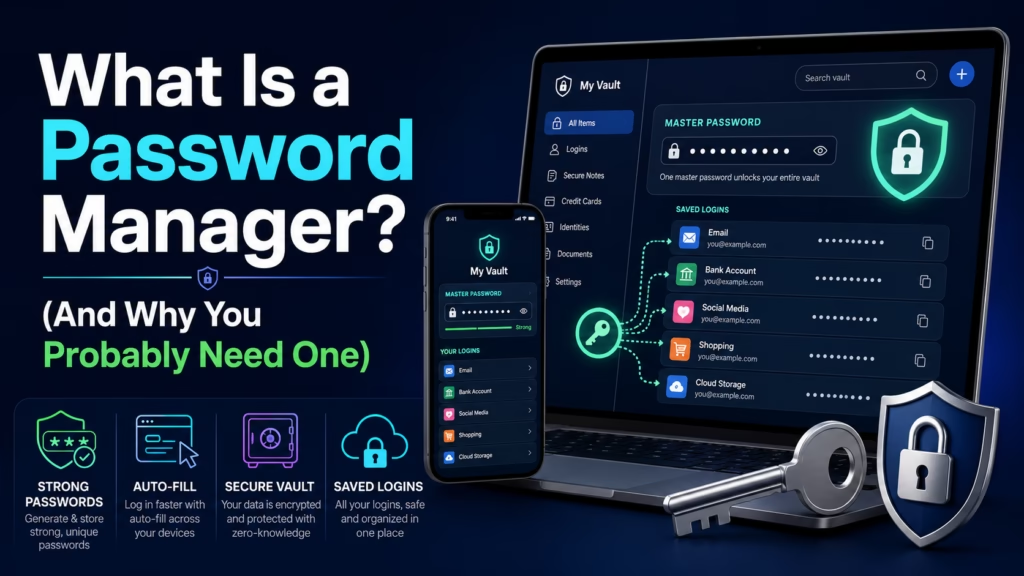
A password manager is an app that generates, stores, and fills in strong, unique passwords for every account you have — so you only need to remember one master password. It makes your accounts significantly more secure because every password is long, random, and different. The risk of the manager being hacked is real but small and well-managed by reputable providers; the risk of reusing weak passwords across dozens of accounts is much larger and more likely to hurt you.
The average person has 70-100 online accounts. Creating and remembering a strong, unique password for each of them is genuinely impossible without help. So people do one of three things: reuse the same password everywhere, use simple passwords that are easy to remember, or use slight variations of the same password (Password1, Password2, Password1!).
All three approaches have the same vulnerability: if any one site you use gets breached and your password is exposed, attackers immediately try that same password on Gmail, your bank, Amazon, PayPal, and everywhere else. This is called credential stuffing, and it’s the most common way accounts get compromised — not sophisticated hacking, just trying stolen passwords from one site on other sites.
A password manager breaks this completely. Every account gets a password like Xk9#mP2@vLq7$nR4 — long, random, impossible to guess, and unique to that site. If that site gets breached, the stolen password is useless everywhere else because it doesn’t match any of your other accounts.
“So the reason to use random passwords isn’t that they’re hard to guess — it’s that even if someone gets one, they can’t use it anywhere else?” — Exactly. Uniqueness matters more than complexity. A unique password that gets leaked hurts one account. A reused password that gets leaked hurts every account that shares it. “I have used variations of the same password for seven years.” I know. We’re fixing that today.
You create one master password — the only one you’ll ever need to remember. The manager encrypts your entire password vault using that master password as the key. The encrypted vault syncs to the manager’s servers and to all your devices.
When you visit a website or app, the manager recognises it and offers to fill in your credentials automatically. When you create a new account, it generates a strong random password and saves it for you. You never see most of your passwords — you just click “fill” and the manager handles it.
The critical security detail: reputable password managers use zero-knowledge encryption. This means they encrypt your vault on your device before it ever reaches their servers. They store the encrypted blob but don’t have your master password and cannot decrypt it — even their own employees cannot see your passwords. If their servers are breached, the attacker gets an encrypted file that’s useless without your master password.
This is Nana’s question, and it’s the right one. If someone gets your master password, they get everything. This is why:
1. Your master password should be genuinely strong — a long passphrase you’ve never used anywhere else. “correct horse battery staple” style: four random words strung together are both strong and memorable. Something like “TeaCupRiverMontana47” is far better than “P@ssw0rd!”
2. Enable two-factor authentication on the password manager itself — so even with the master password, an attacker still needs your phone to get in. We covered how 2FA works here.
3. Never forget the master password — unlike other accounts, there’s usually no recovery if you lose it (by design — no backdoor means no backdoor for attackers either). Write it down and store it somewhere physically secure.
Chrome, Safari, and Firefox all offer to save your passwords. They’re convenient and better than nothing, but they have meaningful limitations compared to dedicated managers.
Browser password saving works well within that browser but poorly across others. It’s tied to your Google or Apple account, meaning if that account is compromised, all your saved passwords are at risk. It doesn’t generate strong passwords as consistently, lacks the security audit features that show you weak or reused passwords, and doesn’t work as smoothly in apps as it does in the browser.
We covered this in more detail in our piece on whether it’s safe to save passwords in your browser — the short version is: it’s fine as a starting point, but a dedicated manager is meaningfully better.
Bitwarden — Free tier that covers most people’s needs completely. Open-source (the code is publicly audited by security researchers). Premium is $10/year. The best value option and widely recommended by security professionals.
1Password — Polished apps, excellent family/team sharing features, strong security track record. $2.99/month individual, $4.99/month for families (up to 5 people). The most user-friendly option.
Apple Passwords (iCloud Keychain) — Built into iPhones, iPads, and Macs. Free, seamless if you’re all-Apple, and genuinely good. Limitation: doesn’t work well on Windows or Android.
Dashlane, Keeper, NordPass — Solid alternatives with good security records. More expensive than Bitwarden without proportional advantages for most users.
If you’re already all-in on Apple devices and don’t use Windows, Apple Passwords is genuinely sufficient. For everyone else, Bitwarden (free) or 1Password (paid) are the standard recommendations.
“I set up Bitwarden. It found 34 accounts using variations of the same password. I was unaware I had 34 accounts.” — Most people are. The audit feature alone is worth it. “I’ve spent the last hour changing passwords and it’s genuinely satisfying.” That’s the correct response. “Also I found an account for a recipe website I joined in 2021 and immediately forgot.” Everyone has one of those.
A password manager generates, stores, and auto-fills strong unique passwords for every account — you only remember one master password. The security gain is enormous: unique passwords mean a breach at one site can’t be used to access your other accounts (credential stuffing). Reputable managers use zero-knowledge encryption, meaning they can’t read your vault even if their servers are compromised. Protect the master password with a strong passphrase and two-factor authentication. Best options: Bitwarden (free, open-source, excellent), 1Password (polished, $3/month), Apple Passwords (free, Apple-only). Browser password saving is better than nothing but weaker than a dedicated manager. The single biggest security improvement most people can make — bigger than almost anything else.

Hi. I’m Ken. I run Two Second Solutions, a one-man agency that somehow landed a fox spirit influencer as a client. I drink too much coffee, blog when I need to vent, and regularly update my résumé just in case she sets the office on fire again. I’m not crying — it’s just spell residue.
By Ken Hollow, the man who tried to explain IP addresses to a fox spirit and accidentally triggered an existential crisis about digital identity “Ken.…
By Ken Hollow, the man who had to explain to a fox spirit that “encrypted” does not mean the message is written in a secret…
By Ken Hollow, the man who had to explain to a fox spirit that the “accept all cookies” button is not an invitation to baked…