SSD vs HDD: What’s the Difference? (And Which One Do You Need?)
By Ken Hollow, the man who replaced a hard drive and was treated like a wizard for making a computer boot in 15 seconds I…
By Ken Hollow, the man who discovered that a fox spirit has been storing the same photos in three different cloud services simultaneously “for safety”
“Ken. I’m paying for iCloud. And Google Photos is free. And I have a Dropbox.”
“Are you storing the same things in all three?”
“.Mostly.”
“Nana, you have triplicate cloud storage.”
“I like having options.”
“You’re paying for two of them unnecessarily.”
She looked genuinely surprised. This is extremely common – people end up with multiple cloud services through a combination of defaults, free trials, and the vague sense that more storage means more safety. Here’s how to actually pick one (or two, at most) that makes sense for how you use your devices.
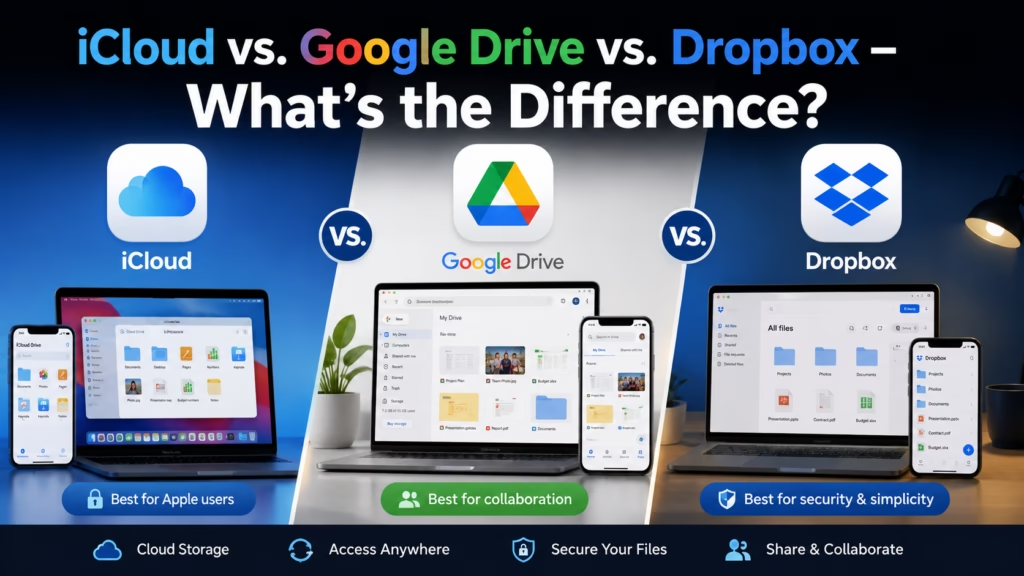
iCloud is the best choice if you’re entirely in the Apple ecosystem (iPhone, Mac, iPad). Google Drive/Photos is the best choice if you use Android or a mix of devices, or want the most generous free storage. Dropbox is best for sharing files with others or cross-platform work collaboration – it’s overkill for personal photo and document storage. Most people only need one.
iCloud is Apple’s cloud service, built directly into every iPhone, iPad, and Mac. If you use Apple devices, iCloud is already working in the background – your photos, contacts, messages, notes, and app data sync through it automatically without any setup.
What makes it good: The integration with Apple devices is seamless. iCloud Photos syncs your photos across all your Apple devices in full quality, automatically. iCloud Drive stores documents. iCloud Backup backs up your iPhone nightly. It all just works without thinking about it.
The catch: Apple gives you only 5 GB free – among the stingiest free tiers of the major services. Most iPhone users fill this quickly with photos alone and end up paying. Also, iCloud is mediocre on non-Apple devices. The Windows app exists but is clunky. There’s no native Android support.
Pricing: 50 GB for $0.99/month | 200 GB for $2.99/month | 2 TB for $9.99/month
Best for: iPhone/Mac/iPad users who want everything to “just work” without thinking about it.
“Apple charges a dollar a month so my photos don’t disappear. And I’ve been paying it for three years. That’s $36.” – Yes. “And I’ve been duplicating those same photos to Google Photos, which is free.” Also yes. “I see the problem now.” I thought you might.
Google’s cloud offering comes in two parts: Google Drive (documents, files, folders) and Google Photos (photos and videos), though they share storage from a single 15 GB free pool. 15 GB is three times Apple’s free tier – enough that many people never need to pay.
What makes it good: Works on everything – Android, iPhone, Windows, Mac, and browsers. If you use Android, Google Photos is your iCloud equivalent: automatic backup, excellent search (Google’s AI can find photos by content – search “beach 2023” and it finds beach photos). Google Docs, Sheets, and Slides are powerful free alternatives to Microsoft Office, all integrated with Drive.
The catch: Google’s privacy model means your data informs Google’s advertising and AI products. For most people this is a theoretical concern, but it’s worth knowing. Also, 15 GB fills faster than it sounds once you include Gmail storage – those count against the same quota.
Pricing: 15 GB free | 100 GB for $2.99/month (Google One) | 200 GB for $3.99/month | 2 TB for $9.99/month
Best for: Android users, anyone with mixed devices (iPhone + Windows laptop, for example), and anyone who wants the most value from a free tier.
Dropbox was the original cloud storage service and pioneered the synced folder model that everyone uses now. It remains excellent at what it does best: syncing a folder of files across multiple devices and sharing files with other people.
What makes it good: Dropbox is the most reliable, fastest-syncing option for shared folders and team collaboration. If you send files to clients, work with a team across different computers, or need to share large files regularly, Dropbox’s sharing and link features are best-in-class.
The catch: The free tier is just 2 GB – nearly useless for photos. Paid plans are significantly more expensive than iCloud or Google for equivalent storage. For personal photo backup and document storage, Dropbox is overpriced and over-engineered compared to the alternatives.
Pricing: 2 GB free | 2 TB for $9.99/month (Plus) | Business plans from $15/user/month
Best for: File sharing with clients or collaborators, team use, and cross-platform folder syncing. Not the right primary choice for personal photos or general backup.
| Feature | iCloud | Google Drive | Dropbox |
|---|---|---|---|
| Free storage | 5 GB | 15 GB | 2 GB |
| 100 GB price | $0.99/mo | $2.99/mo | Not available |
| 2 TB price | $9.99/mo | $9.99/mo | $9.99/mo |
| Best on Apple? | Excellent | Good | Good |
| Best on Android? | Poor | Excellent | Good |
| Photo backup | Excellent (Apple devices) | Excellent (all devices) | Basic |
| File sharing | Good | Good | Best-in-class |
| Office apps included | iWork (Pages, Numbers) | Google Docs, Sheets, Slides | None |
iPhone only ? iCloud. Pay for the 50 GB or 200 GB plan and let it handle everything automatically. It’s the path of least resistance and the integration is genuinely excellent.
Android or mixed devices ? Google Drive + Google Photos. 15 GB free covers a lot. The Google Photos app on iPhone is also excellent – some iPhone users prefer it to iCloud Photos because of Google’s search and organization features.
Need to share files with others ? Add Dropbox alongside your main service. Keep your photos in iCloud or Google; use Dropbox specifically for shared work folders.
And if you’re currently paying for multiple services storing the same things – like Nana – pick one, migrate your files, and cancel the rest. Your wallet will appreciate it.
For a deeper understanding of what cloud storage actually is and how it works, see our guide on what the cloud actually is. And remember to protect whichever account you use with two-factor authentication.
“I cancelled the Dropbox. I kept iCloud because I have an iPhone. And Google Photos stays because it found a photo of me from four years ago when I searched ‘fox in garden’ and I wasn’t expecting that.” – Google Photos is genuinely impressive at that. Also slightly concerning. “Both things can be true.” They absolutely can.
iCloud is the easiest choice for Apple-only users – seamless integration, but only 5 GB free (most people pay). Google Drive/Photos offers 15 GB free, works on all devices, and has excellent photo search – best for Android users or anyone with mixed devices. Dropbox is best-in-class for file sharing and collaboration but has a tiny free tier and is overpriced for personal use. Most people only need one. Pick based on your devices: Apple ecosystem ? iCloud, everything else or mixed ? Google. Add Dropbox only if you actively share files with others.

Hi. I’m Ken. I run Two Second Solutions, a one-man agency that somehow landed a fox spirit influencer as a client. I drink too much coffee, blog when I need to vent, and regularly update my résumé just in case she sets the office on fire again. I’m not crying — it’s just spell residue.
By Ken Hollow, the man who replaced a hard drive and was treated like a wizard for making a computer boot in 15 seconds I…
By Ken Hollow, the man who discovered that a fox spirit has been “backing up” her photos by emailing them to herself since 2019 “Nana.…
By Ken Hollow, the man who had to explain to a fox spirit that her photos don’t literally float above the earth I knew this…