How to Cast Your Phone to a TV: Every Method Explained Simply
By Ken Hollow, personal AV technician for a fox spirit who believes anything smaller than a 55-inch screen is “an insult to content” The request…
By Ken Hollow, the man who had to explain to a fox spirit that leaving her phone face-down on a heating vent in January is not, technically, the phone’s fault
“Ken. My phone is warm.”
“Is it actually hot, or just warm?”
“I can hold it comfortably. It’s just. warm.”
“That’s fine. Phones generate heat. That’s normal.”
“But what if it gets hotter?”
“Then put it down and let it cool off.”
“What if it explodes?”
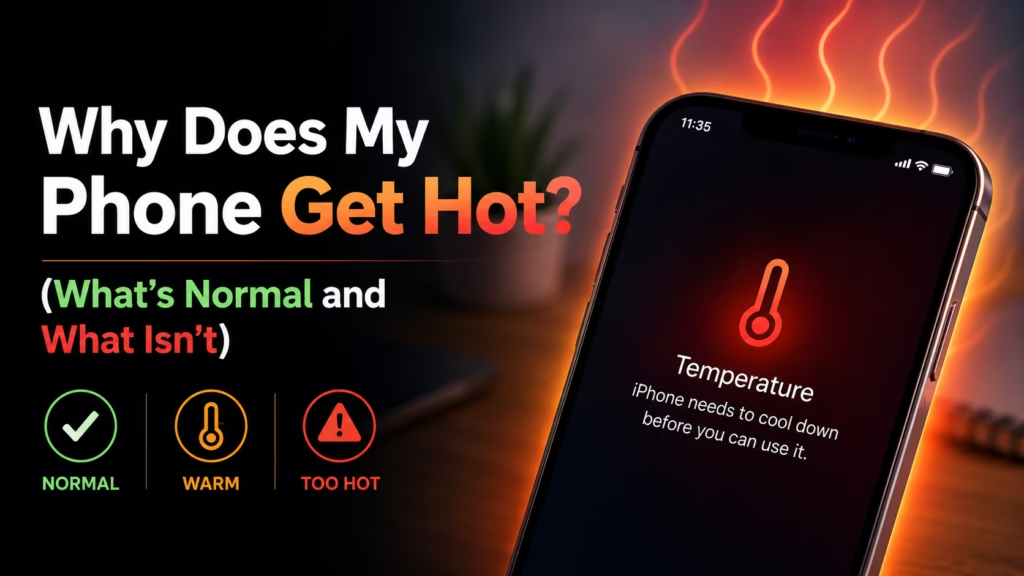
She had been reading news articles again. Phones do not explode under normal circumstances. But “warm” and “dangerously hot” are genuinely different things, and it’s worth knowing the difference.
Phones generate heat as a normal byproduct of the processor working. Warm is normal – you’ll feel it during gaming, video streaming, charging, or using GPS. Hot (uncomfortable to hold, shuts down, shows a temperature warning) means something is wrong: a runaway app, charging in heat, or hardware damage. A warm phone is fine. A phone you can’t comfortably hold for more than a few seconds is a problem to address.
Your phone contains a processor – essentially a tiny computer – that runs everything: your apps, the screen, the cellular and WiFi radios, GPS, cameras. Processors generate heat as a side effect of doing work. The more work they’re doing, the more heat they produce. This is true of every computing device from a smartwatch to a server farm.
Your phone manages this heat mostly through the back panel (the glass or metal back dissipates heat outward) and by throttling the processor when it gets too warm – slowing itself down to reduce heat output. There’s no fan, no cooling vent. The phone itself is the heatsink.
Room temperature also matters. A phone running the same tasks will feel noticeably warmer on a hot summer day than a cold winter one.
These are all expected and nothing to worry about:
Charging. Especially fast charging – converting electricity to stored battery energy generates heat. Wireless charging generates even more heat than wired charging because it’s less efficient.
Gaming or graphic-intensive apps. These push the processor and GPU hard. A phone running a demanding game for 30 minutes will get noticeably warm. This is normal.
Streaming video. Especially at high quality – downloading data, decoding video, and keeping the screen bright simultaneously is a lot of work.
GPS navigation. Running GPS continuously, with the screen on and often downloading map data, is one of the more demanding things a phone does. Cars in summer sun make this worse.
Setting up a new phone. When you restore from a backup or get a new phone, it spends hours downloading apps, indexing photos, and running background processes. It’ll be warm for hours. This is normal and temporary.
“So gaming for two hours and then complaining the phone is warm is like running a marathon and then complaining my legs are tired?” – That’s exactly it. You worked it hard. It got warm. “I see. I retract my concern.” Noted.
There’s a meaningful difference between a warm phone and an overheating phone. Signs you’ve crossed into problem territory:
You can’t hold it comfortably. If the back of your phone is too hot to hold without discomfort, that’s beyond normal operating temperature.
The phone shows a temperature warning. Both iPhones and Android phones will display an overheating warning and may refuse to function until they cool down. This is the phone protecting itself.
Rapid battery drain accompanying the heat. A runaway background process can simultaneously drain the battery and generate excess heat. If your phone is hot when you haven’t been using it, something is running in the background that shouldn’t be.
Hot while doing nothing. A phone sitting on a table, screen off, not charging, should barely be warm. If it’s hot at idle, a process is misbehaving.
A misbehaving app. Sometimes an app gets stuck in a loop, consuming processor and battery without doing anything useful. On iPhone, check Settings ? Battery to see which apps have used the most battery recently. On Android, Settings ? Battery ? Battery Usage. An app using an unreasonable percentage when you haven’t used it is the likely culprit.
Charging in a hot environment. Charging already generates heat. Charging in a hot car, in direct sunlight, or with a thick case trapping heat compounds the problem significantly. Remove the case while charging if heat is a recurring issue.
Old or damaged battery. Batteries degrade over time and can generate more heat as they age, especially under load. iPhone users can check battery health at Settings ? Battery ? Battery Health. Below 80% is the threshold where replacement becomes worth considering.
Cheap or counterfeit chargers. Third-party chargers that don’t properly regulate charging speed can push too much current to the battery, generating excess heat. Use chargers from the phone manufacturer or reputable brands.
“I’ve been charging my phone in my car every day this summer with a two-dollar charger I bought at a gas station.” – I need you to stop doing that. “It was very convenient.” It was also cooking your battery. “The phone is quite old.” It is, and that charger is not helping.
If your phone is genuinely too hot:
1. Stop using it and set it down somewhere cool – not in the freezer (thermal shock can damage components), just room temperature or cooler.
2. Remove the case – cases trap heat. Remove it to help the phone dissipate heat faster.
3. Stop charging if it’s on a charger.
4. Close all apps – force-close everything running in the background.
5. Check for a runaway app in your battery usage settings after it cools down.
6. Restart the phone – this clears any processes stuck in loops.
If overheating is recurring without obvious cause, get the battery checked. A degraded battery is the most common underlying hardware cause.
Phones generate heat as a normal byproduct of processor work – warm during charging, gaming, navigation, or streaming is completely normal. Problem territory is when the phone is too hot to hold comfortably, shows a temperature warning, or is hot while doing nothing (suggesting a runaway background app). Common causes of real overheating: a misbehaving app, charging in hot environments, a degraded old battery, or cheap chargers. Fix it by stopping use, removing the case, closing apps, and restarting. If it’s recurring, check battery health – a battery below 80% capacity is worth replacing.

Hi. I’m Ken. I run Two Second Solutions, a one-man agency that somehow landed a fox spirit influencer as a client. I drink too much coffee, blog when I need to vent, and regularly update my résumé just in case she sets the office on fire again. I’m not crying — it’s just spell residue.
By Ken Hollow, personal AV technician for a fox spirit who believes anything smaller than a 55-inch screen is “an insult to content” The request…
By Ken Hollow, the man whose client drains her phone battery by noon every single day and blames “the universe conspiring against her content” It’s…
By Ken Hollow, the man who once found a phone charging under a pillow at 3am and had to explain the concept of “thermal runaway”…