
Spoiler: Less Than Nana Thinks
By Ken Hollow, reluctant IT department for a fox spirit who thinks private browsing means “the internet can’t see me”
Last Tuesday, Nana asked me — mid-livestream, in front of 2,000 viewers — whether incognito mode makes her “completely invisible on the internet.” I said no. She said I was “blocking her digital ascension.” Chat went wild. I got doxxed by a raccoon emoji.
The thing is, Nana’s not alone in this confusion. A study from the University of Chicago found that 73% of people misunderstand what incognito mode actually does. Most assume it hides everything. It doesn’t. Not even close.
So let’s clear this up — simply, accurately, and without any mystical fox commentary. (She’ll interrupt anyway.)
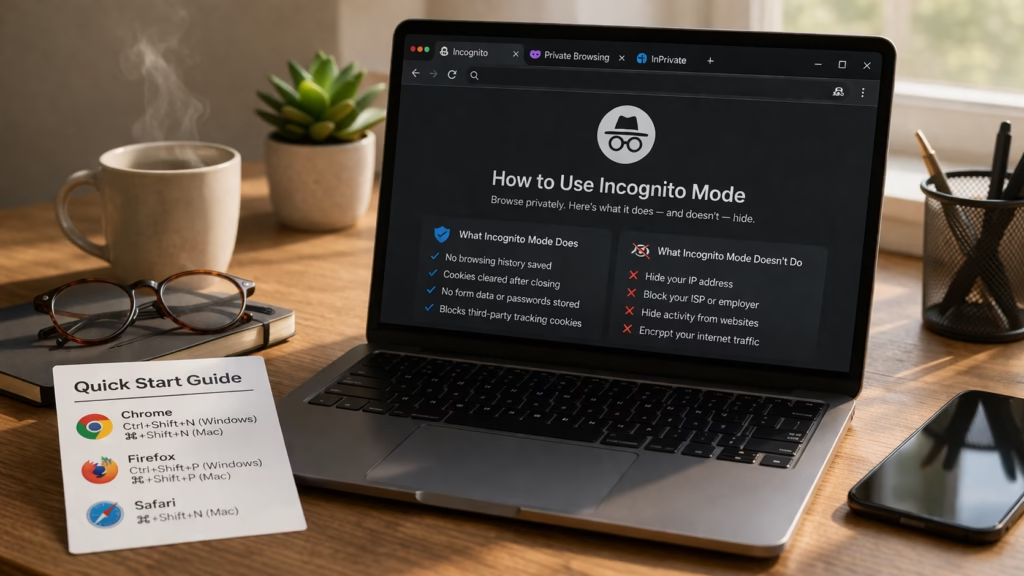
Incognito mode (also called Private Browsing) prevents your browser from saving your browsing history, cookies, and form data on your device. That’s it. It does NOT hide your activity from your internet provider, your employer, the websites you visit, or anyone monitoring your network. It’s a local privacy tool, not an invisibility cloak.
How Incognito Mode Actually Works
When you open an incognito window, your browser starts a temporary session that’s completely separate from your normal browsing. During this session, the browser behaves differently in a few specific ways.
It won’t save any record of the websites you visit to your browsing history. Any cookies that websites set during the session get wiped the moment you close the window. Form data, passwords, and autofill entries from the session aren’t stored either. And third-party tracking cookies — the ones advertisers use to follow you around the web — are blocked by default in most modern browsers.
That’s genuinely useful. If you share a laptop with someone, incognito means they won’t see what you were browsing. If you’re shopping for a gift on a family computer, no spoiled surprises. If you want to log into a second account on the same site without logging out of the first, incognito handles that cleanly.
But here’s where the misunderstanding kicks in: all of that protection is local. It only affects what happens on your device. Once your data leaves your browser and travels through the internet, incognito mode has absolutely no effect.
“Wait. So you’re saying the internet can still see me? Then what’s the POINT?” — This is exactly the reaction 73% of users have, Nana. You’re in good company.
What Incognito Mode Hides vs. What It Doesn’t
This is the core of the confusion, so here’s a side-by-side breakdown:
The critical takeaway: incognito is a device-level privacy tool. It controls what your browser remembers. It has zero control over what the rest of the internet sees.
Who Can Still See What You’re Doing in Incognito?
This is the part that surprises most people. Even with incognito mode enabled, the following parties can still observe your browsing activity:
| ✅ What Incognito DOES Hide | ❌ What Incognito DOESN’T Hide |
|---|---|
| Your browsing history on that device | Your IP address (visible to every site you visit) |
| Cookies and site data (deleted when you close) | Your activity from your ISP / internet provider |
| Form data and passwords entered during session | Your browsing from your employer or school network |
| Your activity from other people who use the same device | Files you download (they stay on your device) |
| Personalized search results and recommendations | Bookmarks you save (they persist after closing) |
Your Internet Service Provider (ISP)
Your ISP handles every request your device makes to the internet. Incognito mode doesn’t encrypt your traffic or mask your IP address, so your provider can still see which websites you’re connecting to, when, and for how long. This is true whether you’re on your home WiFi or mobile data.
Your Employer or School Network
If you’re using a work or school network, the network administrator can monitor your traffic at the router and firewall level. Incognito mode doesn’t touch any of that. Your employer might not see the exact page you’re reading, but they can absolutely see that you visited the website.
The Websites You Visit
Every website you connect to sees your IP address — that’s just how the internet works. Your IP reveals your approximate location, your ISP, and can be logged alongside every page you view. Sites also use browser fingerprinting — a technique that identifies users based on their device type, screen resolution, installed fonts, and other technical details. Incognito mode doesn’t prevent any of this.
Google (If You’re Signed In)
Here’s a detail that caught a lot of people off guard: if you sign into your Google account while in incognito mode, Google can still log your search and browsing activity to your account. The 2024 class-action settlement against Google over incognito data collection resulted in Google agreeing to delete billions of data records and updating its incognito disclaimers to be more transparent about this.
“So my ISP, my network, the websites, AND Google can all see me? Then incognito is just… a disguise for my own laptop?” — Yes, Nana. That’s exactly what it is.
Does Private Browsing Work the Same in Every Browser?
Pretty much, yes. The feature has different names depending on your browser, but the core functionality is nearly identical across the board.
Chrome calls it Incognito Mode. Firefox and Safari call it Private Browsing. Edge calls it InPrivate Browsing. Opera calls it Private Window. In every case, the browser creates a temporary session that doesn’t save history, cookies, or form data locally. In every case, your IP address and internet traffic remain visible to external parties.
Firefox does go slightly further with its Enhanced Tracking Protection, which blocks some known trackers even outside of private mode. But the fundamental limitation is the same: private browsing is a local tool, not a network-level shield.
When Should You Actually Use Incognito Mode?
Despite its limitations, incognito mode is genuinely helpful in specific situations. It’s not useless — it’s just not what many people think it is.
Shared devices: If you’re using a family computer, a library terminal, or a friend’s laptop, incognito keeps your session clean. No saved passwords, no browsing history left behind, no accidental logins persisting after you leave.
Gift shopping: Browsing for a birthday present on a shared device? Incognito prevents those suspiciously specific ads from showing up in your partner’s browser later.
Testing websites without cache: Developers and marketers use incognito to see what a website looks like without any stored cookies or cached data. It’s a quick way to get a “fresh visitor” perspective.
Multiple account logins: Need to be logged into two different email accounts at the same time? Open one in regular browsing and one in incognito. Problem solved.
Avoiding price tracking: Some travel and shopping sites adjust prices based on your browsing behavior. Incognito can help you see baseline prices since the site doesn’t have your cookie history.
“I use incognito to shop for velvet capes without Ken judging my cart. It works perfectly for that.” — …She’s not wrong.
What to Use Instead If You Want Actual Privacy
If your goal goes beyond hiding your history from your roommate — if you actually want to prevent your ISP, network, or websites from tracking your activity — you need tools that work at the network level, not just the browser level.
A VPN (Virtual Private Network)
A VPN encrypts your internet traffic and routes it through a remote server, replacing your real IP address with the server’s. This means your ISP can see that you’re connected to a VPN, but can’t see what you’re doing. Websites see the VPN server’s IP address instead of yours. It’s the single most effective upgrade over incognito mode for everyday privacy.
The Tor Browser
Tor routes your traffic through multiple encrypted layers across a global network of volunteer servers, making it extremely difficult to trace activity back to you. It’s slower than a VPN but offers stronger anonymity. It’s often used by journalists, activists, and privacy-focused users.
Privacy-Focused Browsers
Browsers like Brave or Firefox (with enhanced settings) offer more aggressive tracker blocking, fingerprint protection, and other features that go well beyond what incognito mode provides in Chrome.
Combining Tools
For the best protection, use a VPN alongside a privacy-focused browser and incognito/private mode. Each layer addresses a different part of the tracking chain: the VPN handles your network traffic, the browser blocks trackers and fingerprinting, and incognito keeps your local device clean.
Common Myths About Incognito Mode
Let’s kill these off quickly, because they refuse to die:
“Incognito mode protects me from viruses.” No. It has absolutely nothing to do with malware protection. You need antivirus software for that.
“Incognito makes me anonymous to websites.” No. Websites still see your IP address and can use browser fingerprinting to identify you.
“My employer can’t see what I’m doing in incognito.” They absolutely can if you’re on their network. The traffic passes through their infrastructure before it even reaches the internet.
“Bookmarks and downloads disappear when I close incognito.” Nope. Bookmarks you save and files you download persist on your device after the session ends. Only history, cookies, and form data get erased.
TL;DR
Incognito mode is a local housekeeping tool. It keeps your device’s browser history clean and prevents cookies from persisting after your session. That’s valuable for shared devices, gift shopping, and avoiding awkward autofill moments. But it does NOT make you invisible online. Your ISP, your employer, the websites you visit, and Google (if you’re signed in) can all still see your activity. For real privacy, you need a VPN.
“So what you’re saying is… I should use incognito AND a VPN AND probably stop announcing my browsing habits on livestream?” — Yes. All of that. Especially the last part.

Hi. I’m Ken. I run Two Second Solutions, a one-man agency that somehow landed a fox spirit influencer as a client. I drink too much coffee, blog when I need to vent, and regularly update my résumé just in case she sets the office on fire again. I’m not crying — it’s just spell residue.