How to Check If Your Email Has Been Hacked (Free, 60-Second Check)
By Ken Hollow, the man whose email appeared in nine data breaches and has the trust issues to prove it Nana’s email was sending messages…
By Ken Hollow, the man who watched a fox spirit get locked out of her own email account for forty-five minutes because she didn’t recognize the two-factor prompt she’d set up herself
“Ken. My email is asking me to enter a code it sent to my phone. But the code expired. And now it’s asking for a backup code. I don’t have a backup code.”
“Did you set up two-factor authentication?”
“I don’t know. Possibly. You told me to turn on ‘all the security things.'”
“I did say that.”
“And now I’m locked out because of your advice.”
To be clear: two-factor authentication is still the right call. We just also needed to save the backup codes. Lesson learned. Here’s what 2FA actually is, how it works, and how to use it without locking yourself out.
Two-factor authentication (2FA) adds a second step to logging in. Instead of just a password, you also need a second piece of proof – usually a code sent to your phone or generated by an app. Even if someone steals your password, they can’t get into your account without that second factor. It’s the single most effective thing you can do to protect your online accounts.
Passwords get stolen constantly – through data breaches, phishing emails, malware, and people reusing the same password across multiple sites. When one site gets hacked and your email and password are exposed, attackers immediately try those same credentials on Gmail, your bank, Amazon, and everywhere else. This is called credential stuffing, and it’s extremely common.
If your password is the only thing protecting your account, a stolen password means a compromised account. Two-factor authentication breaks this because the attacker also needs physical access to your phone (or wherever the second factor lives). A password alone is one lock. Two-factor is two locks – one that can be copied, one that can’t.
Checking whether your email or passwords have already been exposed in a breach is a smart first step – here’s how to do that.
SMS codes (text message): A code is texted to your phone number. You enter it to log in. This is the most common form and much better than no 2FA – but it’s the weakest of the three because SIM swapping attacks can redirect your texts to an attacker’s phone. Still: SMS 2FA beats no 2FA for most people in most situations.
Authenticator app codes: An app on your phone (Google Authenticator, Authy, or similar) generates a new 6-digit code every 30 seconds. These codes are generated locally on your device – they’re not sent over the network – which makes them much harder to intercept. This is the recommended method for most accounts.
Hardware security keys: A physical USB or NFC key (like a YubiKey) that you plug in or tap to authenticate. The most secure option, used mainly by people with high-security needs. Probably overkill unless you’re protecting very sensitive accounts.
“So the text message version is like a lock made of paper, the app version is a proper lock, and the USB key is a deadbolt?” – That’s a reasonable security gradient. Use the app where you can. The text message is still miles better than nothing.
When you set up 2FA with an authenticator app, the website shares a secret key with your app (usually via a QR code you scan). Your app and the website’s server use the same key and the current time to independently calculate the same 6-digit code every 30 seconds. When you log in, you enter the code your app is showing – the server checks that it matches what it calculated and lets you in.
Because the code is time-based and changes every 30 seconds, and because it’s generated locally without network transmission, intercepting it is extremely difficult. Even if someone captures the code, it’s useless within 30 seconds.
Good free authenticator apps: Google Authenticator, Authy (backs up your codes to the cloud – useful if you lose your phone), Microsoft Authenticator.
Priority order for turning on 2FA:
Email first. Your email is the master key to everything – password resets for every other account go to your email. If someone controls your email, they can reset and take over every other account. Protect this above all else.
Financial accounts. Bank, brokerage, PayPal, Venmo, crypto exchanges. The consequences of these being compromised are immediate and financial.
Social media. Facebook, Instagram, Twitter/X – these accounts are frequently targeted for spam, scams, and impersonation.
Cloud storage and work accounts. iCloud, Google, Microsoft – these hold large amounts of personal data and documents.
Anything with your payment info saved. Amazon, online stores, app stores.
When you set up 2FA, most services give you a set of backup codes – one-time codes you can use if you lose access to your phone. Save these. Print them, store them in a password manager, or put them somewhere you’ll actually find them.
Losing your phone without backup codes means going through an often painful account recovery process. Some services make this very difficult by design – because if it were easy, attackers would just use the recovery process to bypass 2FA.
This is how Nana ended up locked out of her email for 45 minutes. The backup codes existed. They were just in a folder on her computer called “stuff.” Filed between a recipe for dumplings and a PDF of a train schedule from 2019.
“I now keep my backup codes in a folder labeled ‘IMPORTANT – ACTUALLY IMPORTANT’ to distinguish it from the folder labeled ‘Important’ which contains coupons.” – This is the correct solution and I will not criticize the filing system that works.
Two-factor authentication adds a second step when logging in – usually a code from your phone – so that a stolen password alone isn’t enough to access your account. SMS codes (text messages) are the most common and better than nothing; authenticator apps are more secure and the recommended option; hardware keys are the most secure but rarely necessary for most people. Set up 2FA on your email account first – it protects everything else. When you enable 2FA, save the backup codes somewhere you’ll actually find them. Losing your phone without backup codes can mean a difficult account recovery process.

Hi. I’m Ken. I run Two Second Solutions, a one-man agency that somehow landed a fox spirit influencer as a client. I drink too much coffee, blog when I need to vent, and regularly update my résumé just in case she sets the office on fire again. I’m not crying — it’s just spell residue.
By Ken Hollow, the man whose email appeared in nine data breaches and has the trust issues to prove it Nana’s email was sending messages…
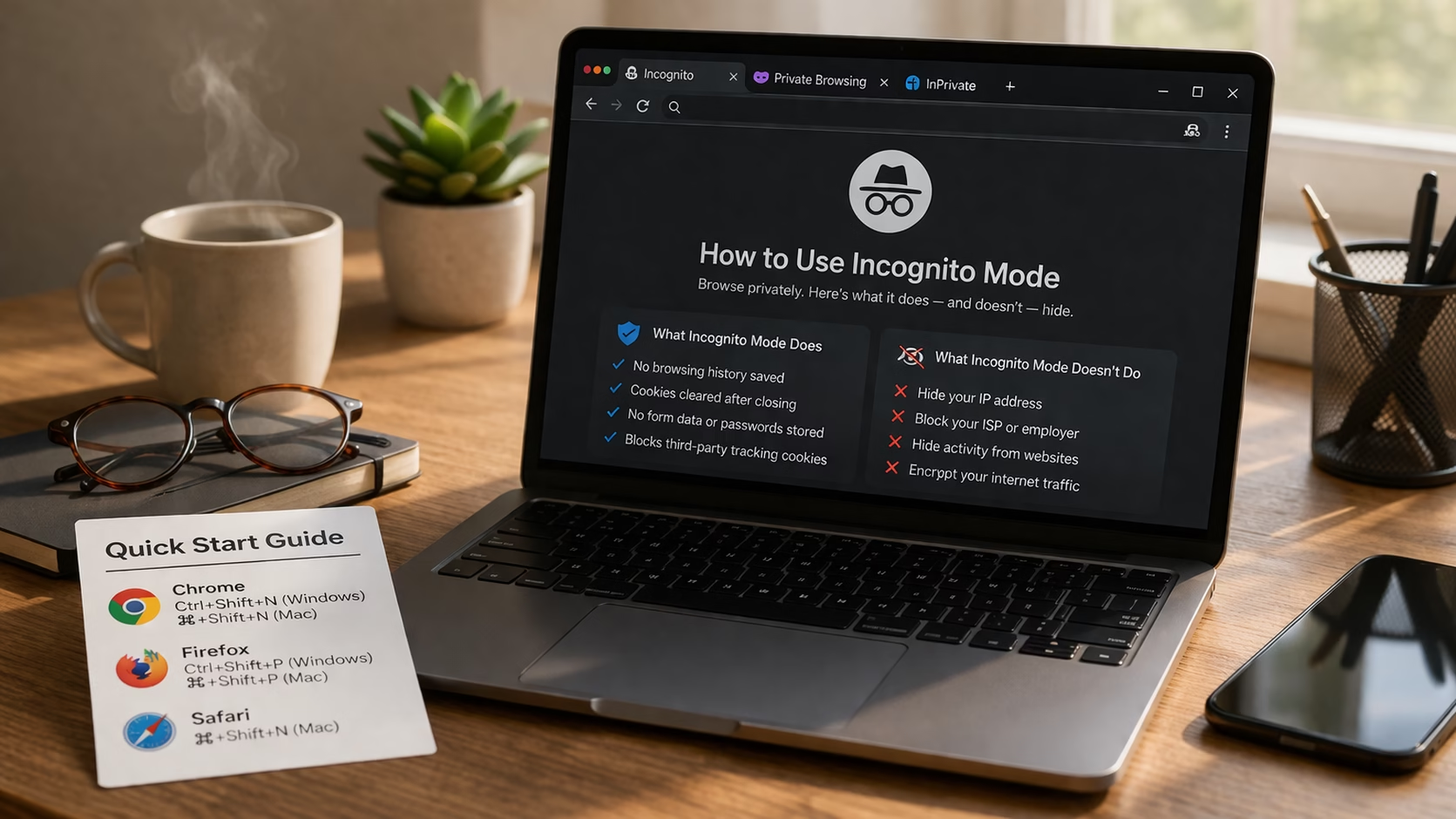
Spoiler: Less Than Nana Thinks By Ken Hollow, reluctant IT department for a fox spirit who thinks private browsing means “the internet can’t see me”…

By Ken Hollow, the WiFi owner who wishes he couldn’t see Nana’s browsing history “Ken. Can you see what I’m doing on the WiFi?” I…