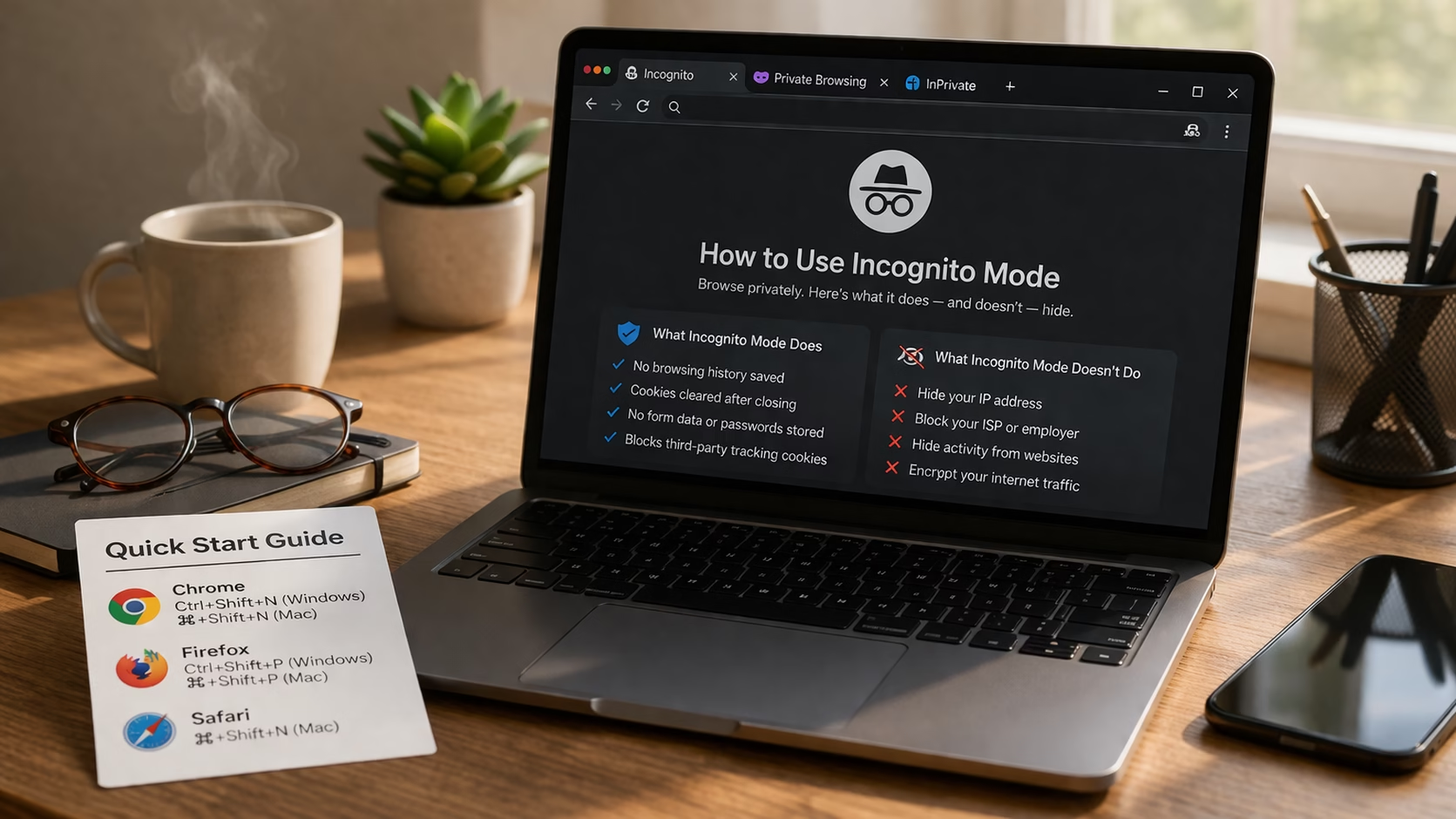
What Does Incognito Mode Actually Hide?
Spoiler: Less Than Nana Thinks By Ken Hollow, reluctant IT department for a fox spirit who thinks private browsing means “the internet can’t see me”…

By Ken Hollow, the man who had to explain encryption to someone who thinks her WiFi password is a “digital incantation”
I knew it was going to be a long day when Nana looked up from her phone and said, “Ken. Someone on the internet knows where I live.”
“That’s… how the internet works, Nana.”
“Fix it.”
And that’s how I ended up explaining VPNs to a fox spirit for forty-five minutes. She interrupted eleven times. She called encryption “digital sorcery” (not entirely wrong). And at the end, she said, “So it’s an invisibility cloak for my WiFi?”
Close enough.
If you’ve seen VPN ads everywhere but never quite understood what they actually do — or whether you genuinely need one — this is the guide for you. No jargon. No scare tactics. Just what it is, how it works, and when it’s actually worth your money.
A VPN (Virtual Private Network) encrypts your internet traffic and routes it through a remote server, hiding your IP address and making your online activity much harder to track. It prevents your ISP from seeing what you do online, protects you on public WiFi, and can let you access content that’s restricted in your location. It costs a few dollars a month and takes about two minutes to set up.
Without a VPN, here’s what happens every time you visit a website: your device sends a request through your router, to your internet service provider (ISP), and then out to the website’s server. At every step, your real IP address — which reveals your approximate location and identifies your connection — is visible. Your ISP can see which websites you visit, when you visit them, and how long you stay. The websites themselves log your IP address too.
A VPN inserts itself into that chain. When you turn it on, your internet traffic gets encrypted on your device before it goes anywhere. That encrypted data travels to a VPN server (which could be in your country or anywhere else in the world), where it’s decrypted and sent on to the website you’re trying to reach. The website sees the VPN server’s IP address instead of yours.
The result: your ISP can see that you’re connected to a VPN, but can’t see what you’re doing. The websites you visit see the VPN server’s location, not yours. And anyone trying to intercept your data in transit gets nothing but encrypted gibberish.
Think of it this way: normally, your internet activity is like sending postcards — anyone handling them can read what’s written. A VPN puts every postcard in a sealed, opaque envelope and mails it from a different return address.
“So instead of sending a postcard that says ‘Nana was here,’ I’m sending a sealed letter from… Portugal?” — Yes. And Portugal has no idea who you are either.
VPN companies spend millions on marketing that makes it sound like you’ll get hacked instantly without one. That’s overselling it. But there are several situations where a VPN is genuinely valuable — and a few where it’s essential.
This is the strongest case for a VPN. When you connect to free WiFi at a coffee shop, airport, hotel, or library, you’re sharing a network with strangers. On an unsecured network, someone with basic tools can potentially intercept your traffic. A VPN encrypts everything before it leaves your device, making public WiFi dramatically safer.
If you ever do any kind of banking, shopping, or login activity on public WiFi without a VPN, you’re taking an unnecessary risk.
In many countries, your ISP is legally allowed to collect and sell your browsing data. Even where that’s restricted, your ISP can still see every website you connect to. If you read our post on what incognito mode actually hides, you’ll remember that incognito does nothing to prevent this. A VPN does — your ISP only sees encrypted traffic heading to a VPN server, not what you’re actually doing.
Streaming libraries vary by country. A show available on Netflix in the UK might not exist on Netflix in the US, and vice versa. By connecting to a VPN server in a different country, you can access that country’s content library. The same applies to sports broadcasts, news sites, and other regionally restricted content.
Worth noting: streaming services actively try to detect and block VPN traffic, so not every VPN works with every service. The better VPN providers invest in staying ahead of these blocks.
In countries where the government restricts access to certain websites or platforms, a VPN can bypass those blocks by routing your traffic through a server in a country without those restrictions. This is a critical tool for journalists, activists, and anyone living under internet censorship.
If you work remotely and need to access your company’s internal network, you’ve probably already used a corporate VPN. This is actually the original use case for VPN technology — securely connecting remote workers to a private business network over the public internet.
Honesty check: VPN marketing often implies that you’re in constant danger without one. Here’s when a VPN doesn’t actually help:
General browsing on your home WiFi. If you’re just browsing the web at home, your risk is relatively low. Most websites already use HTTPS encryption (look for the padlock in your browser), which protects the content of your communications even without a VPN. A VPN adds an extra layer, but it’s not urgent for casual browsing on a network you control.
Protecting against viruses or malware. A VPN encrypts your traffic. It doesn’t scan for malware, block phishing sites, or prevent you from downloading something dangerous. You still need antivirus software for that.
Making you completely anonymous. If you sign into Google, Facebook, or any other account while using a VPN, those services still know it’s you. The VPN hides your IP address from them, but your login ties your activity to your identity. True anonymity requires more than just a VPN — it requires changing your behavior online too.
Preventing all tracking. Browser fingerprinting, cookies (if you accept them), and login-based tracking all work regardless of whether you’re on a VPN. A VPN handles the network layer. It doesn’t control what happens inside your browser.
“So a VPN won’t stop Google from knowing I searched ‘how to curse a slow WiFi router’?” — Correct. Google saw that. Google remembers.
There are hundreds of VPN services. Most of them advertise the same things: “military-grade encryption,” “thousands of servers,” “blazing fast speeds.” Here’s what actually matters when picking one:
The most important factor. A no-logs policy means the VPN provider doesn’t record your browsing activity. If they don’t store it, they can’t hand it over — not to advertisers, not to governments, not to anyone. Look for VPNs whose no-logs claims have been independently audited by third-party security firms, not just self-declared.
All VPNs slow your connection slightly because of the encryption overhead and the extra hop through their server. With a good VPN, this slowdown is barely noticeable — maybe 10-20% reduction. With a bad one, it can make streaming and video calls painful. The better providers invest heavily in high-speed server infrastructure to minimize this.
More locations means more options for geo-restricted content and generally better speeds (since you can connect to a server closer to you). A VPN with servers in 60+ countries covers most use cases.
A good VPN works on your phone, laptop, tablet, and ideally your router (which protects everything on your home WiFi at once). Most quality providers allow 5-8 simultaneous connections on one subscription.
Premium VPNs typically cost between $3 and $7 per month when you commit to a longer-term plan (1-2 years). Monthly plans run $10-13. This is one of those cases where you genuinely get what you pay for.
Here’s the uncomfortable truth: if a VPN is free, you’re probably the product. Running a VPN infrastructure is expensive — servers in dozens of countries, bandwidth, engineering staff. That money has to come from somewhere.
Some free VPNs monetize by logging and selling your browsing data — the exact thing you’re trying to prevent. Others inject ads into your browsing. A few have been caught bundling malware. Studies have found that a significant portion of free VPN apps on mobile app stores have serious privacy or security issues.
There are a handful of reputable free options with limited data caps (ProtonVPN’s free tier is the most respected), but for everyday use, a paid VPN from a trusted provider is worth the few dollars a month.
If you’ve never used a VPN before, the setup is genuinely simple. There’s no technical configuration required for personal use.
Most VPN apps have a simple on/off toggle right on the home screen. You can leave it running all the time or turn it on only when you need it — like before connecting to public WiFi or when you want to access geo-restricted content.
The whole process takes about two minutes from signup to connected.
These three get confused constantly, so here’s the quick breakdown:
| Tool | What It Does | What It Doesn’t Do |
|---|---|---|
| Incognito Mode | Stops your browser from saving history, cookies, and form data on your device | Doesn’t hide your IP, encrypt traffic, or prevent ISP/employer tracking |
| VPN | Encrypts all traffic, hides your IP address, prevents ISP from seeing your activity | Doesn’t block cookies, prevent login-based tracking, or protect against malware |
| Tor Browser | Routes traffic through multiple encrypted layers for strong anonymity | Very slow, not practical for streaming or daily browsing, blocked by many sites |
For most people, the sweet spot is using a VPN for everyday privacy and switching to incognito mode when you want to keep your local browsing history clean (like gift shopping on a shared device). Tor is for situations where strong anonymity matters more than speed — journalists, activists, and specific privacy-sensitive tasks.
For the best protection, combine them: VPN on for network encryption, incognito mode for local privacy, and a privacy-focused browser like Firefox or Brave on top.
“VPNs are only for people doing something shady.” No. Using a VPN is like closing your curtains — it doesn’t mean you’re doing anything wrong. It means you prefer privacy. In a world where ISPs can sell your data and public WiFi is inherently insecure, wanting privacy is just common sense.
“A VPN makes me completely untraceable.” Not quite. It hides your IP and encrypts your traffic, which is significant. But if you log into accounts, accept cookies, or use services tied to your real identity, those services still know who you are. A VPN handles one important layer of privacy, not all of them.
“All VPNs are basically the same.” They really aren’t. Speed, privacy policies, server infrastructure, and whether they actually work with streaming services vary enormously. A low-quality VPN can be worse than no VPN at all if it’s logging your data or leaking your IP address.
“VPNs make your internet faster.” Generally no — there’s always some overhead from encryption. But in cases where your ISP is throttling specific activities (like streaming or gaming), a VPN can actually bypass that throttling and restore your normal speed. So occasionally, yes.
“I told my viewers to get a VPN and one of them asked if it would fix their slow WiFi. It will not. But it might stop their ISP from judging their streaming habits.”
A VPN encrypts your internet traffic and hides your IP address by routing everything through a remote server. It’s essential on public WiFi, valuable for stopping ISP tracking, and useful for accessing geo-restricted content. It won’t make you invisible (you still need good habits), it won’t protect against malware (you need antivirus for that), and free VPNs are usually a bad idea. A reputable paid VPN costs a few dollars a month, takes two minutes to set up, and is one of the simplest upgrades you can make to your online privacy.

Hi. I’m Ken. I run Two Second Solutions, a one-man agency that somehow landed a fox spirit influencer as a client. I drink too much coffee, blog when I need to vent, and regularly update my résumé just in case she sets the office on fire again. I’m not crying — it’s just spell residue.